Property · Select a property, draw a box or polygon, or upload a boundary
Compare the terrain of up to 5 New York properties
Compare properties side by side on the numbers that decide whether a parcel works: elevation range, slope classes, modeled winter sun and a drainage indicator. Save up to 5 places and the table fills in as each one is analyzed.
The shortlist is kept in your browser, with notes per property, and exports as a file you can share with a partner or a builder.
Free to run · pay to download
Free to run, and free to save as a PNG image of the map. This tool has no file export of its own. For the terrain as a file, Download Data exports contours, a GeoTIFF or a 3D mesh with a pass: US$29 for 24 hours, US$99 for 30 days or US$399 for 12 months.
Who uses this
- Buyers of rural acreage. Rank a shortlist on terrain before driving out to see any of them.
- Buyer’s agents. Give clients a like-for-like terrain table.
When to use it
- You are choosing between several parcels and want the terrain numbers in one table.
- You want to come back to a shortlist later without selecting each parcel again.
Tools for your job
Saved Properties is one step in a bigger question. These are the jobs it helps with, and the tools that go with it.
For the job: Buying a lot or rural acreage
What is the ground like, and how does it compare with the others on my list?
- 1.Property — Selects the tax parcel so every other tool is clipped to the boundary.
- 2.Property Report — A PDF with contours, slope, aspect, winter sun, drainage and elevation for that one parcel.
- 3.Saved Properties (this tool) — Up to 5 places side by side: elevation, slope, winter sun and drainage.
- 4.Water & Drainage — Where water will run and pond across the property in heavy rain.
How to use it
- Select a parcel, or draw or upload a boundary.
- Choose Analyze and save property. The terrain is sampled and the snapshot is stored.
- Repeat for up to 5 places. The table updates as each one finishes.
- Add notes per property, and export the shortlist as a JSON file to keep or share.
Step by step: a New York County parcel
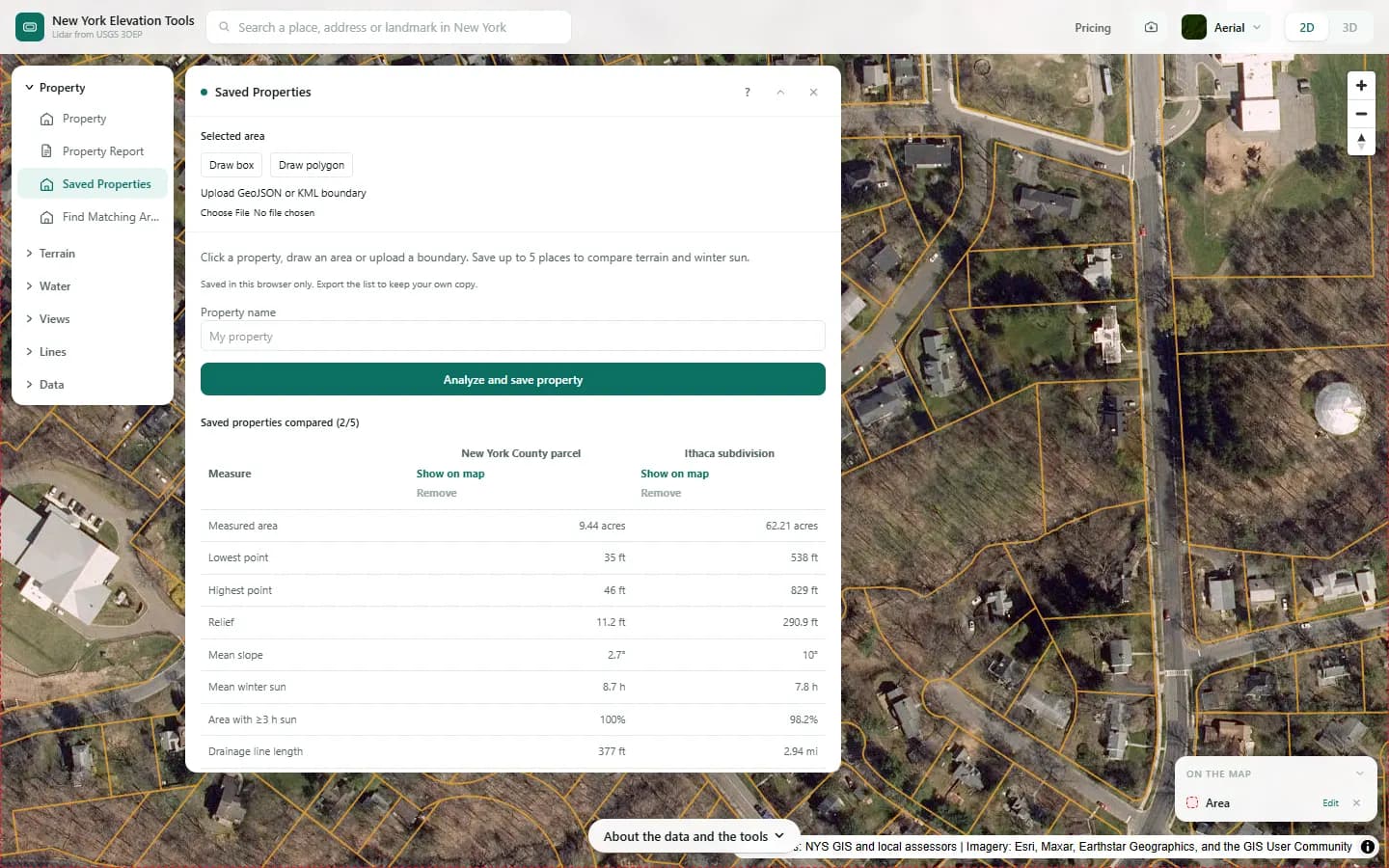
We save the New York County parcel and an area of hillside housing in Ithaca, then compare the two.

What it showed
- The city parcel is nearly flat while the Ithaca hillside rises almost 300 ft; the table puts the difference in numbers instead of impressions.
- The list stays in this browser. Export comparison saves it as a file you can keep or send.
Screenshots from New York Elevation Tools. Imagery: Esri, Maxar, Earthstar Geographics, and the GIS User Community. Elevation data from USGS 3D Elevation Program. USGS 3DEP data is in the public domain (U.S. Government work).
How it works
For each saved boundary the tool loads the terrain and computes the mean and range of elevation, slope classes, modeled hours of direct sun on the shortest day (December 21) and a drainage indicator from flow accumulation, then stores the results with the boundary.
Everything lives in your browser’s local storage. Nothing is sent to a server or tied to an account, which is also why the list is per device.
Reading the results
Compare like with like: a 10-acre parcel and a 100-acre parcel will differ in elevation range simply because of size.
Winter sun hours are modeled on bare ground for December 21 and ignore trees and buildings.
Limits and caveats
- Five snapshots per browser. Saving the same boundary again replaces its snapshot.
- Clearing site data in the browser removes the list. Export the JSON first if you want to keep it.
- Where lidar has not been flown, the USGS 3DEP model falls back to its 1/3 arc-second layer, about 33 ft per pixel, and downloads state what share of the area came from it. That coarser model is not fit for site-scale decisions. Lidar coverage and source resolution vary across New York. Check your location against the USGS 3DEP index; no statewide coverage percentage is asserted. The fallback is rare.
Data and attribution
Results come from the USGS 3D Elevation Program (3DEP) bare-earth elevation model: lidar at 3.3 ft per pixel where it has been flown, and the 1/3 arc-second model, about 33 ft per pixel, elsewhere, with elevations above NAVD 88. This edition uses bare-earth terrain only. Buildings and trees are excluded.
USGS 3DEP elevation and USGS maps are U.S. Government works in the public domain. Credit the USGS 3D Elevation Program. NYS public tax parcels are assessment data provided as is, not surveys. Esri World Imagery follows its own terms and is display-only; downloaded aerial imagery comes from USGS NAIP.
Questions
Where is my shortlist stored?
In your browser only. Nothing is sent to a server and there is no account, so the list is per device. Export it to keep a copy.
Ready to try it?
Open Saved Properties on the map →Free to use, no account. The analysis runs in your browser on public-domain USGS 3DEP data. Downloading the results needs a pass: see pricing.