Property · Click a point
Property terrain report for any New York tax parcel
The property terrain report is a multi-page PDF site analysis for one New York parcel, built from the USGS 3DEP lidar elevation model: hillshade, contours, slope and aspect breakdowns, elevation statistics and a checklist of the local and state records it does not replace.
Use it as a terrain check before you buy, or as the first page of a design brief before you pay for a topographic survey. It is ready in minutes and tells you whether the ground is worth that spend.
See what a finished report contains →
Free to run · pay to download
See the full result on the map free, with no account. Download the PDF report and its data bundle of GIS, CAD and 3D files with a pass: US$29 for 24 hours, US$99 for 30 days or US$399 for 12 months, a one-off payment in US dollars that never renews. Every download on the site is included while the pass lasts.
Who uses this
- Buyers of rural acreage. Compare the terrain on every parcel on the shortlist before paying for inspections on one.
- Architects and designers. Get the ground shape, slope classes and aspect at the start of a project.
- Real estate agents and sellers. Answer the slope and drainage questions buyers ask.
When to use it
- You want something to send to a client, a builder or a family member rather than a screen.
- You are shortlisting rural acreage and want the same terrain summary for each parcel.
- You need a record of what the ground looked like when the lidar was flown.
Tools for your job
Property Report is one step in a bigger question. These are the jobs it helps with, and the tools that go with it.
For the job: Buying a lot or rural acreage
What is the ground like, and how does it compare with the others on my list?
- 1.Property — Selects the tax parcel so every other tool is clipped to the boundary.
- 2.Property Report (this tool) — A PDF with contours, slope, aspect, winter sun, drainage and elevation for that one parcel.
- 3.Saved Properties — Up to 5 places side by side: elevation, slope, winter sun and drainage.
- 4.Water & Drainage — Where water will run and pond across the property in heavy rain.
How to use it
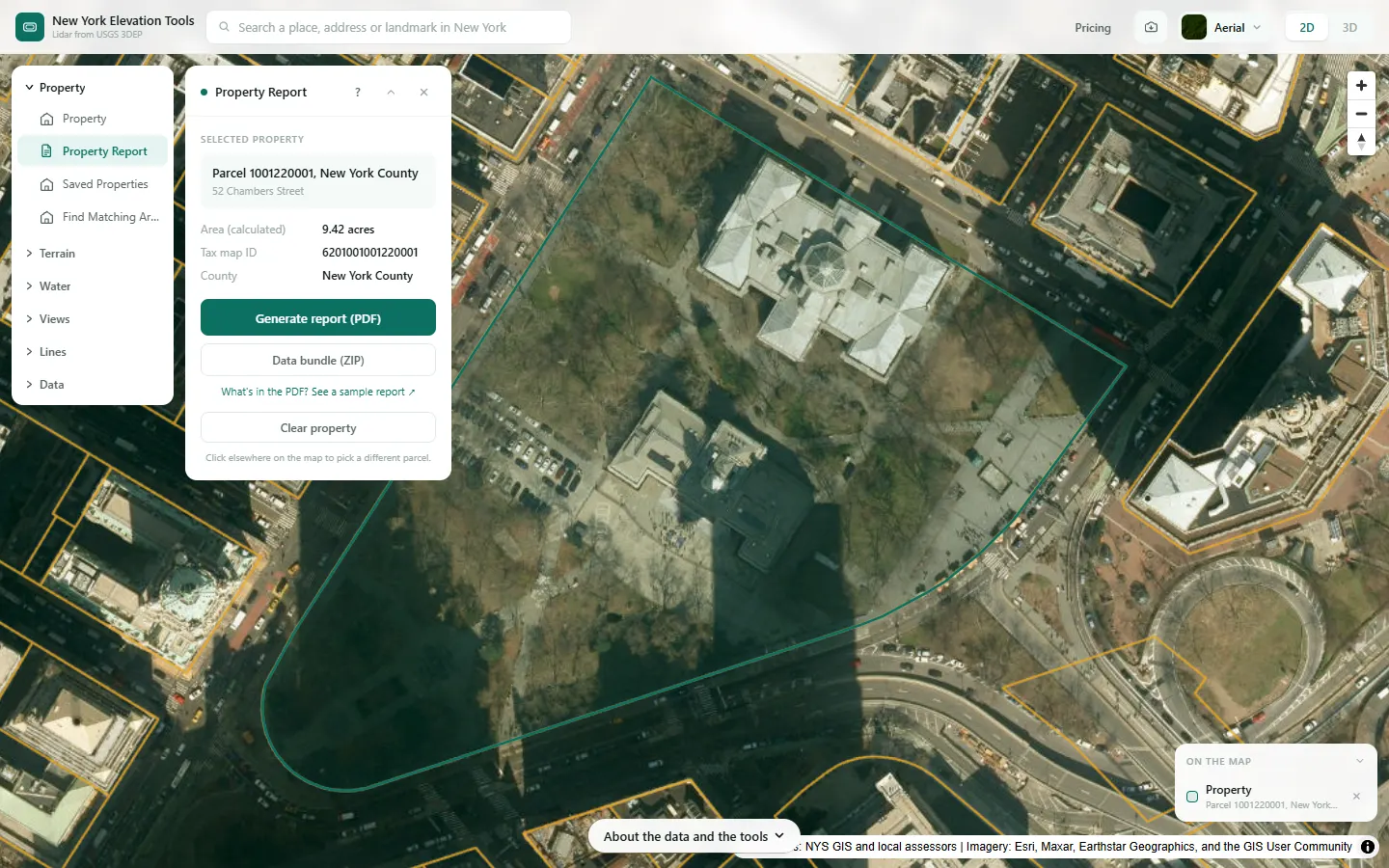
- Open Property Report and click inside the parcel, or search its address first.
- Wait for the preview. Larger parcels take longer because more terrain is loaded.
- Choose Download report for the PDF, or the data bundle, a ZIP with the elevation model as a GeoTIFF, the contours as GeoJSON, DXF, Shapefile and KML, a 3D terrain model as STL, the property boundary as GeoJSON and KML, and a README.
Step by step: a New York County parcel
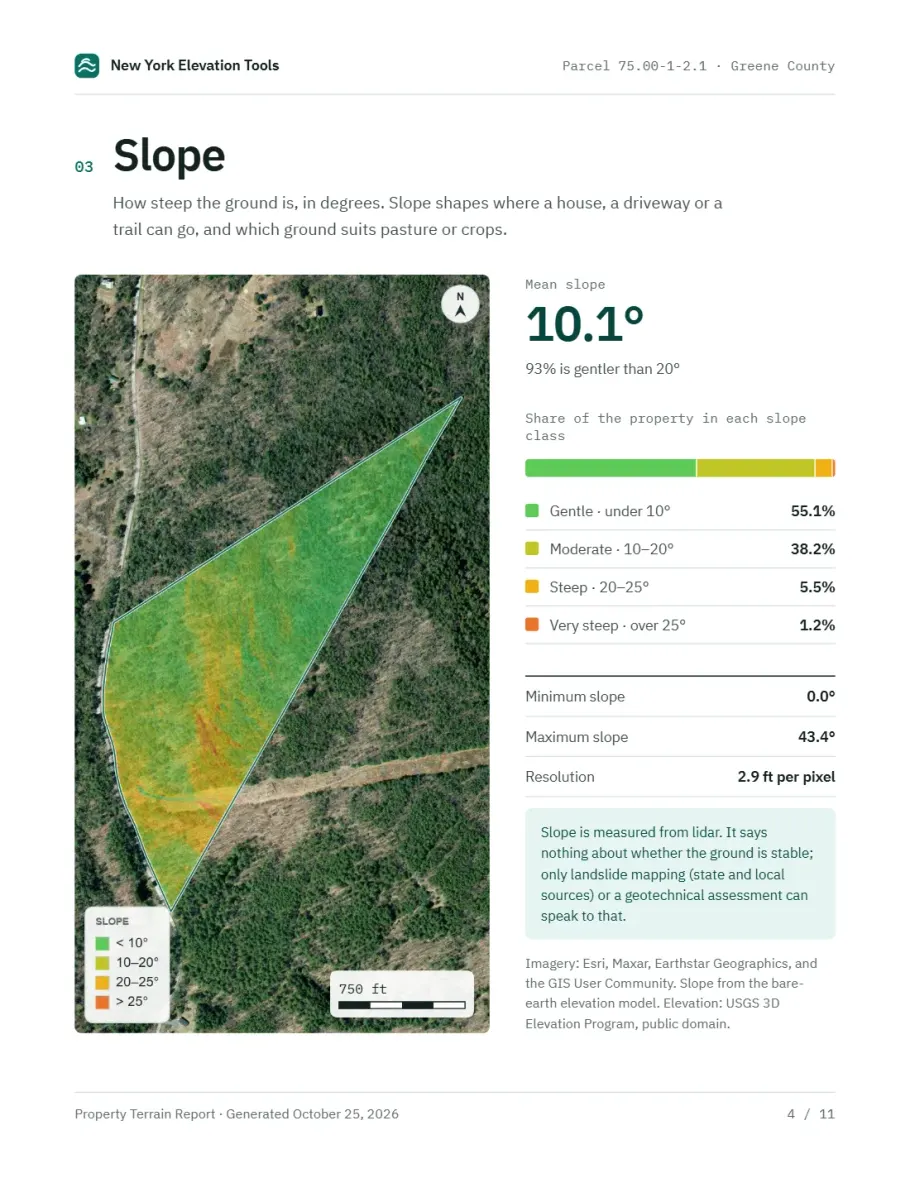
We select the same New York County parcel in Property Report, then look at three pages of the sample report, built for a Greene County parcel.


What it showed
- Page 2 sums the report up in a few findings. The other pages cover contours, aspect, drainage, hillshade and elevation statistics, and the report closes with the local, state and federal records it does not replace, and where to check each one.
- The data bundle (ZIP) gives you the underlying files for GIS and CAD: the elevation model as a GeoTIFF, the contours as GeoJSON, DXF, Shapefile and KML, a 3D terrain model as STL, the property boundary as GeoJSON and KML, and a README.
Screenshots from New York Elevation Tools. Imagery: Esri, Maxar, Earthstar Geographics, and the GIS User Community. Elevation data from USGS 3D Elevation Program. USGS 3DEP data is in the public domain (U.S. Government work).
How it works
The parcel boundary is fetched from the NYS GeoHub public tax parcel service and the USGS 3DEP elevation model is loaded for its extent. Contours, slope, aspect and elevation statistics are computed on that terrain and clipped to the boundary.
The maps are drawn in your browser and sent to this site’s server, which assembles the pages into a PDF, with the data sources named on the attribution page.
The closing checklist lists the records a terrain report cannot stand in for: local assessor and planning records, FEMA flood maps, state and local hazard information, wells and water supply, septic and wetlands records and a preliminary title report, with verified links where available.
Reading the results
Slope classes are given as a share of the parcel. The report uses four bands: under 10, 10 to 20, 20 to 25 and over 25 degrees. As a rough guide, ground under 10 degrees is easy to build on, and over 25 degrees calls for a geotechnical engineer.
Aspect is where each face points. In New York, south-facing ground gets the most winter sun.
Elevations are in feet above NAVD 88, the national vertical datum, which is close to mean sea level.
Limits and caveats
- A terrain report is not a survey, a geotechnical report or a planning review. It shows the ground shape on the date the lidar was flown.
- Where lidar has not been flown, the USGS 3DEP model falls back to its 1/3 arc-second layer, about 33 ft per pixel, and downloads state what share of the area came from it. That coarser model is not fit for site-scale decisions. Lidar coverage and source resolution vary across New York. Check your location against the USGS 3DEP index; no statewide coverage percentage is asserted. The fallback is rare.
- Parcels larger than the area limit are refused. Draw a smaller area with the other tools instead.
Data and attribution
Results come from the USGS 3D Elevation Program (3DEP) bare-earth elevation model: lidar at 3.3 ft per pixel where it has been flown, and the 1/3 arc-second model, about 33 ft per pixel, elsewhere, with elevations above NAVD 88. This edition uses bare-earth terrain only. Buildings and trees are excluded.
USGS 3DEP elevation and USGS maps are U.S. Government works in the public domain. Credit the USGS 3D Elevation Program. NYS public tax parcels are assessment data provided as is, not surveys. Esri World Imagery follows its own terms and is display-only; downloaded aerial imagery comes from USGS NAIP.
Questions
Is this a substitute for a topographic survey?
No. It shows the ground as the lidar recorded it, which is good enough to decide whether a site is worth pursuing and to start concept design. Permit drawings, boundary work and engineering design still need a licensed surveyor and, on steep or unstable ground, a geotechnical engineer.
What is in the data bundle?
A ZIP of the underlying files for the parcel: the elevation model as a GeoTIFF, the contours as GeoJSON, DXF, Shapefile and KML, a 3D terrain model as STL, the property boundary as GeoJSON and KML, and a README, so a designer can take the site straight into GIS or CAD. The PDF report is a separate download.
Can I see the report before paying?
Yes. The preview is built on screen for free. Downloading the PDF or the bundle needs a pass.
What does the checklist cover?
The records a terrain report cannot stand in for: local assessor and planning records, FEMA flood maps, state and local hazard information, wildfire information, wells and water supply, septic and wetlands records and a preliminary title report, with agencies named and verified links where available.
Ready to try it?
Open Property Report on the map →Free to use, no account. The maps are drawn in your browser and the PDF is assembled on this site’s server from public-domain USGS 3DEP data. Downloading the results needs a pass: see pricing.