Lines · Tap two endpoints
Farm road and driveway route planner by grade
This farm road grade planner finds a route between two points that favors gentle grades and stays under the maximum grade you set, then shows its elevation profile. It switchbacks up a face the way a road designer would, using the USGS 3DEP lidar model.
Use it to test whether a grade limit can be met at all, and to sketch where a road or driveway could go before walking it with a contractor.
Free to run · pay to download
See the full result on the map free, with no account. Download the route as GeoJSON and its profile as CSV with a pass: US$29 for 24 hours, US$99 for 30 days or US$399 for 12 months, a one-off payment in US dollars that never renews. Every download on the site is included while the pass lasts.
Who uses this
- Farmers, ranchers and foresters. Sketch a road line that equipment can use.
- Rural landowners. Test whether a driveway to the house site can make the grade.
When to use it
- Sketching where a farm road, a driveway or a trail could go on a hillside.
- Checking whether a grade limit can be met at all between two points.
Tools for your job
Route Explorer is one step in a bigger question. These are the jobs it helps with, and the tools that go with it.
For the job: Excavation, driveways and farm roads
How much digging, and can a driveway or farm road make the grade?
- 1.Cut & Fill — Cut and fill in cubic yards to level a pad, at an elevation you set or the one that balances.
- 2.Elevation Profile — Grade along a proposed driveway, section by section.
- 3.Route Explorer (this tool) — Finds a line between two points that stays under a maximum grade.
- 4.Contour Lines — Site contours at 1 or 2 ft to hand to a designer.
How to use it
- Open Route Explorer and tap the start and the end.
- Set the maximum route grade in percent.
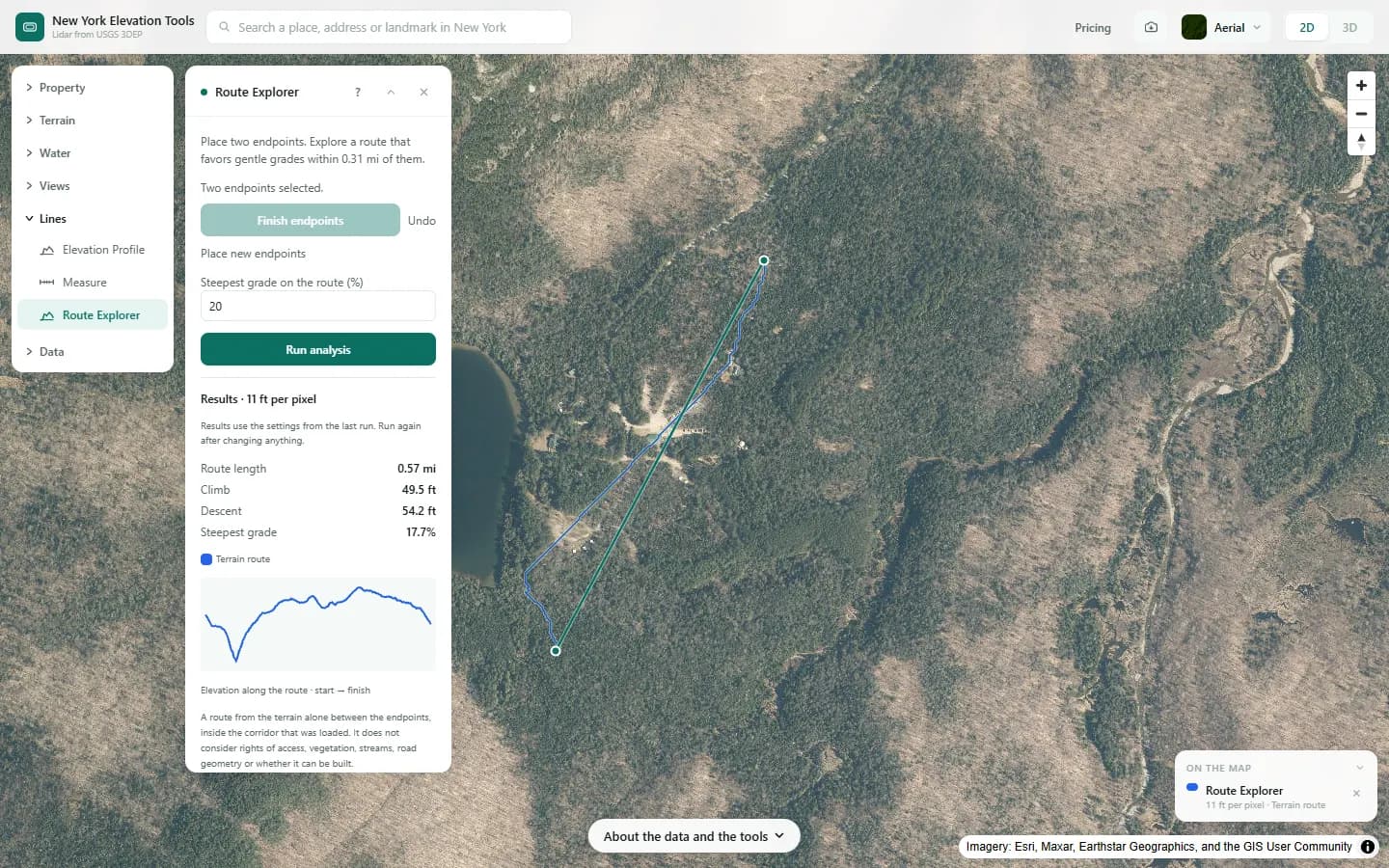
- Finish the endpoints and run. The route is drawn, and the profile appears in the panel.
- Export the route as GeoJSON and the profile as CSV.
Step by step: Mount Marcy
We ask for a route across the example area that never gets steeper than 20%.

What it showed
- Lower the grade limit and the route gets longer. If no route fits, the profile shows where the limit is broken.
Screenshots from New York Elevation Tools. Imagery: Esri, Maxar, Earthstar Geographics, and the GIS User Community. Elevation data from USGS 3D Elevation Program. USGS 3DEP data is in the public domain (U.S. Government work).
How it works
Terrain is loaded for the two endpoints plus a 0.31 mi margin. Every cell is a node connected to its eight neighbors, with a cost that grows with distance and with grade, and a very high cost above your limit. The lowest-cost path from start to end is found, which is why the route switchbacks up a face rather than going straight.
Reading the results
The profile shows the grade the route actually achieves. If parts still exceed your limit, no route within the margin could avoid them.
Length and total climb are along the route, not the straight line.
Limits and caveats
- A terrain exploration aid, not a road design. Cut and fill, drainage, culverts, sight distances and legal access are not considered.
- The search is limited to 0.31 mi either side of the endpoints, so a route that needs a wide detour will not be found.
- Where lidar has not been flown, the USGS 3DEP model falls back to its 1/3 arc-second layer, about 33 ft per pixel, and downloads state what share of the area came from it. That coarser model is not fit for site-scale decisions. Lidar coverage and source resolution vary across New York. Check your location against the USGS 3DEP index; no statewide coverage percentage is asserted. The fallback is rare.
Data and attribution
Results come from the USGS 3D Elevation Program (3DEP) bare-earth elevation model: lidar at 3.3 ft per pixel where it has been flown, and the 1/3 arc-second model, about 33 ft per pixel, elsewhere, with elevations above NAVD 88. This edition uses bare-earth terrain only. Buildings and trees are excluded.
USGS 3DEP elevation and USGS maps are U.S. Government works in the public domain. Credit the USGS 3D Elevation Program. NYS public tax parcels are assessment data provided as is, not surveys. Esri World Imagery follows its own terms and is display-only; downloaded aerial imagery comes from USGS NAIP.
Questions
Is this a road design?
No. It is a terrain exploration aid. Cut and fill, drainage, culverts, sight distances and legal access are not considered.
Ready to try it?
Open Route Explorer on the map →Free to use, no account. The analysis runs in your browser on public-domain USGS 3DEP data. Downloading the results needs a pass: see pricing.